Datasoft
BMS
A complete role-based Business Management System. One platform where company owners run their entire operation, covering projects, tasks, timesheets, expenses, milestone-based invoices, and goals, while clients track their work in a dedicated portal.
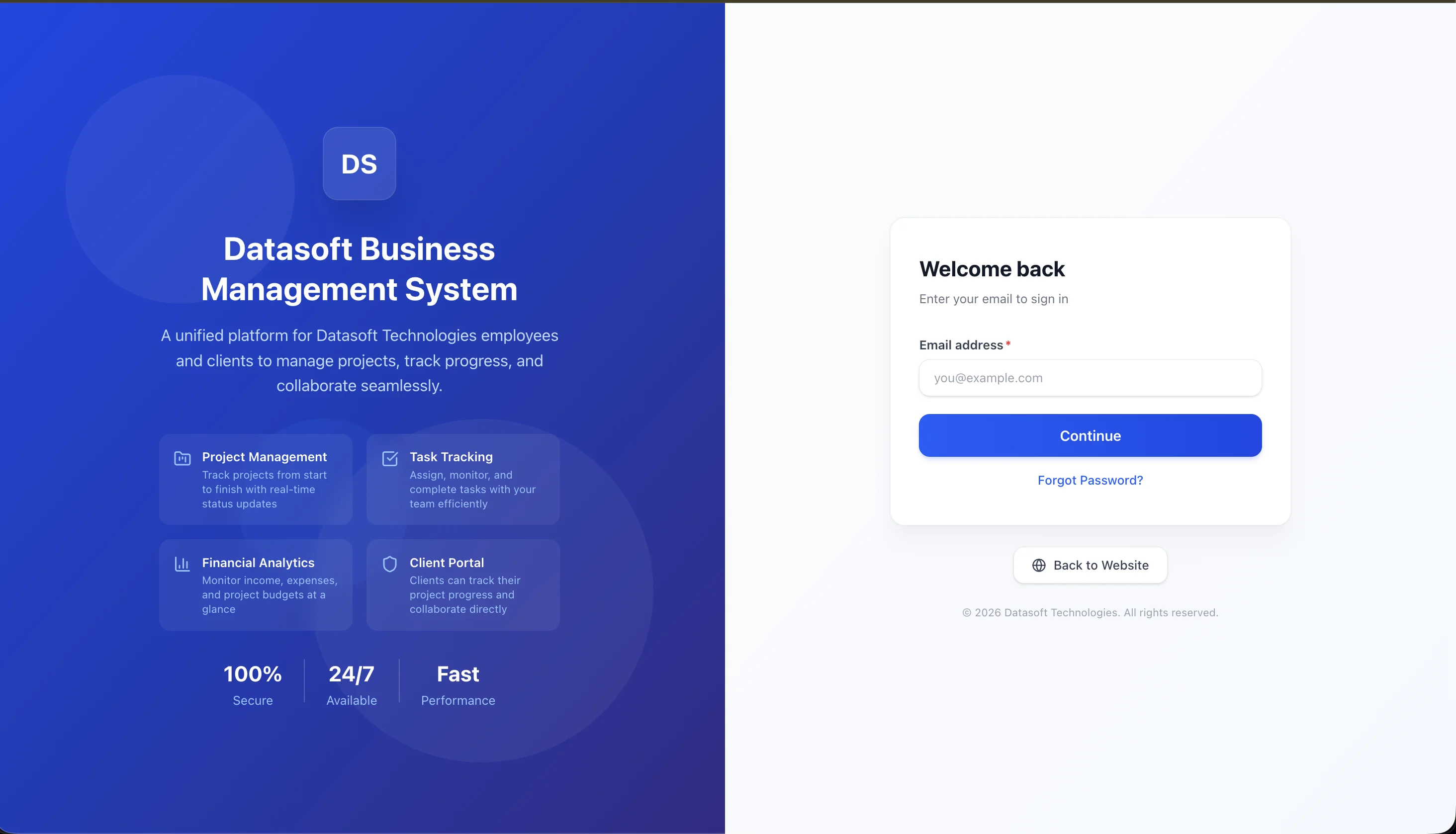
Project Type
Business Management SaaS
Status
Live in Production
Platform
Web Application
Core Stack
Laravel 12 API · React 19
TypeScript · Tailwind v4
Three Roles, One Platform
Every user sees exactly what they need, no more and no less. Built on Sanctum-backed token auth with strict role middleware on every API endpoint.
Admin / Owner
The company owner. Total command over the operation, from team and finance to client delivery and reporting.
- Manage users, projects, departments
- Invoices, payments, milestones, reminders
- Expenses, categories, financial reports
- Goals, plans, company settings
Employee
Internal team members. Focused on execution: assigned projects, tasks, time logs, and collaboration.
- View & update assigned projects/tasks
- Log timesheets & daily progress
- Comment + attach files (polymorphic)
- Personal dashboard & notifications
Client
External customers. A clean, mostly read-only portal to track delivery, settle invoices, and stay in the loop.
- View their projects & live progress
- Comment on tasks & projects
- See invoices, milestones & pay online
- Receive automated reminders
Full Technology Stack
Production-grade frameworks and tools powering every layer of the platform, from backend API to native mobile apps.
Backend & API
Frontend
Architecture
A Complete Operations Suite
Take a desktop-first walkthrough of every module. It's built as a decoupled Laravel REST API consumed by a fast React + TypeScript SPA, with strict role-based guards everywhere.
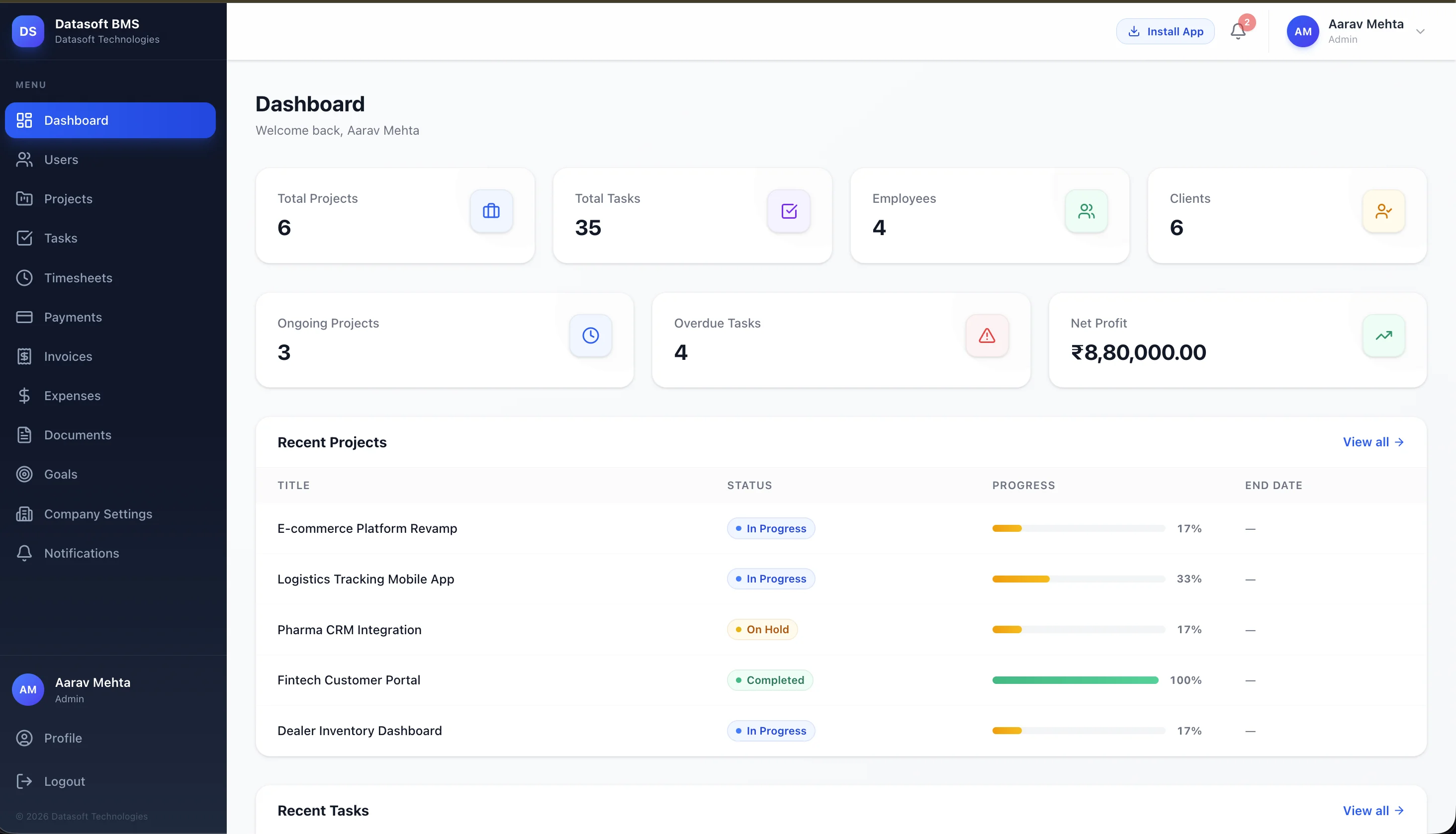
Real-Time Admin Dashboard
The control room for company owners. Live KPIs sit at a glance: Total Projects, Tasks, Employees and Clients up top, with Ongoing Projects, Overdue Tasks and Net Profit just below. Recent Projects render as a sortable, status-coloured table.
Live KPI Tiles
Eight headline metrics (projects, tasks, headcount, ongoing work, overdue items and net profit) all driven by the API.
Recent Projects Table
Every project shows status, progress bar and end date, clickable straight through to the project detail page.
Header Notifications
Unread badge in the top bar opens straight to the notifications panel for invoices, payments and reminders.
User & Role Management
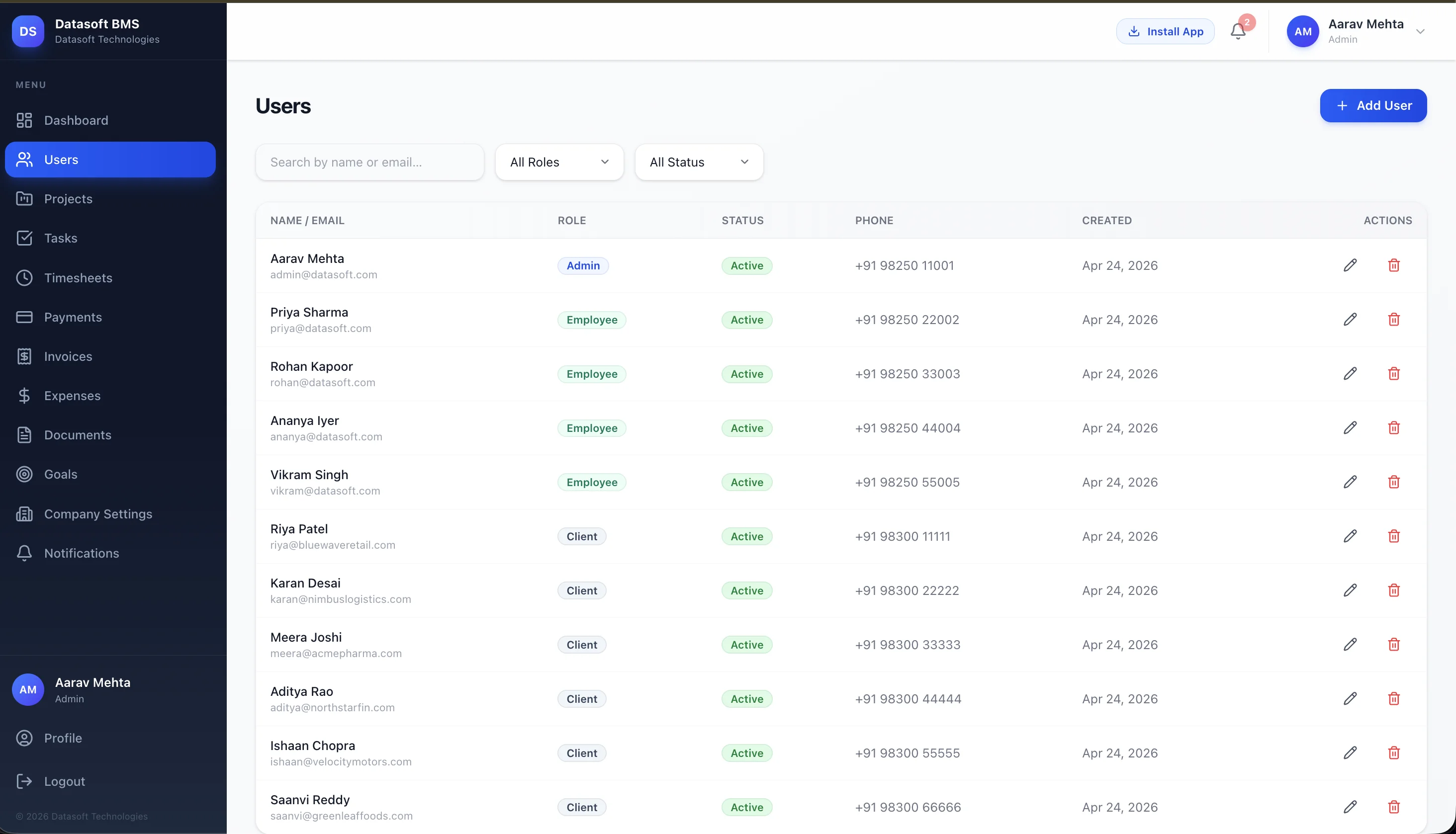
One unified directory for the whole organisation: admins, employees and clients side-by-side, with role badges, status, contact info and quick edit or delete actions. Search, filter by role or status, and add new users in a click.
Three Roles, One List
Admins, Employees and Clients are managed from a single screen, and colour-coded badges keep responsibilities clear at a glance.
Search & Filter
Find anyone by name or email and filter by role or active/inactive status, all built into the same toolbar.
Onboard in Seconds
"Add User" assigns a role, sets initial credentials and dispatches a welcome email. Soft deletes keep history intact.
Project Management
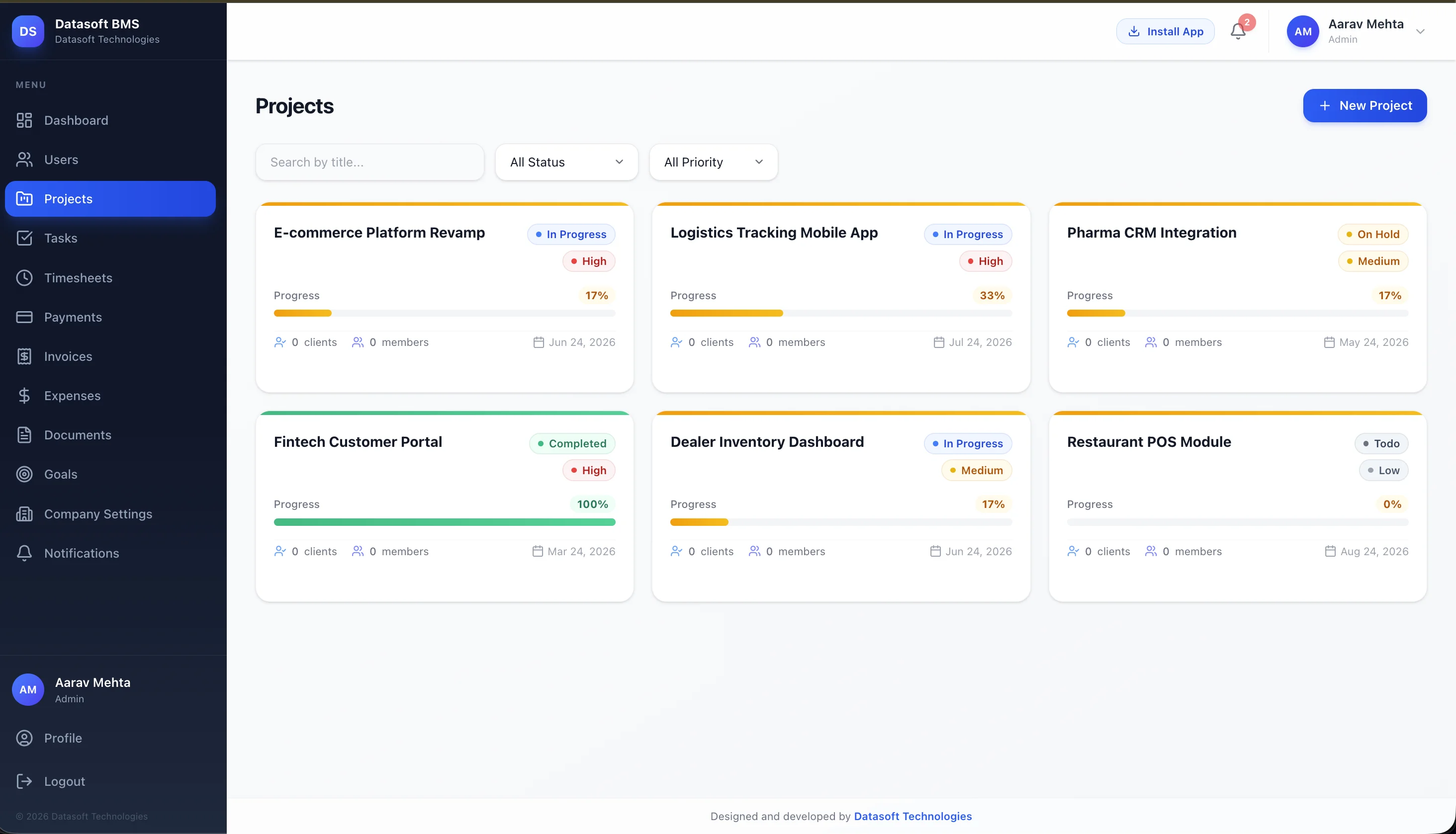
Every project carries its own clients, team, status, priority, deadline and an auto-computed progress bar driven by completed tasks. A card-based grid view with status colour rails lets you search, filter by status or priority, and create a new project in one click.
Multi-Client & Multi-Team
Pivot tables (project_client, project_employee) let you assign multiple clients and any number of employees to a single project.
Auto-Computed Progress
Project progress is calculated server-side from tasks.status = 'done'. No manual updates, never stale.
Polymorphic Comments + Files
Threaded comments and attachments work across both Projects and Tasks via Laravel polymorphic relationships.
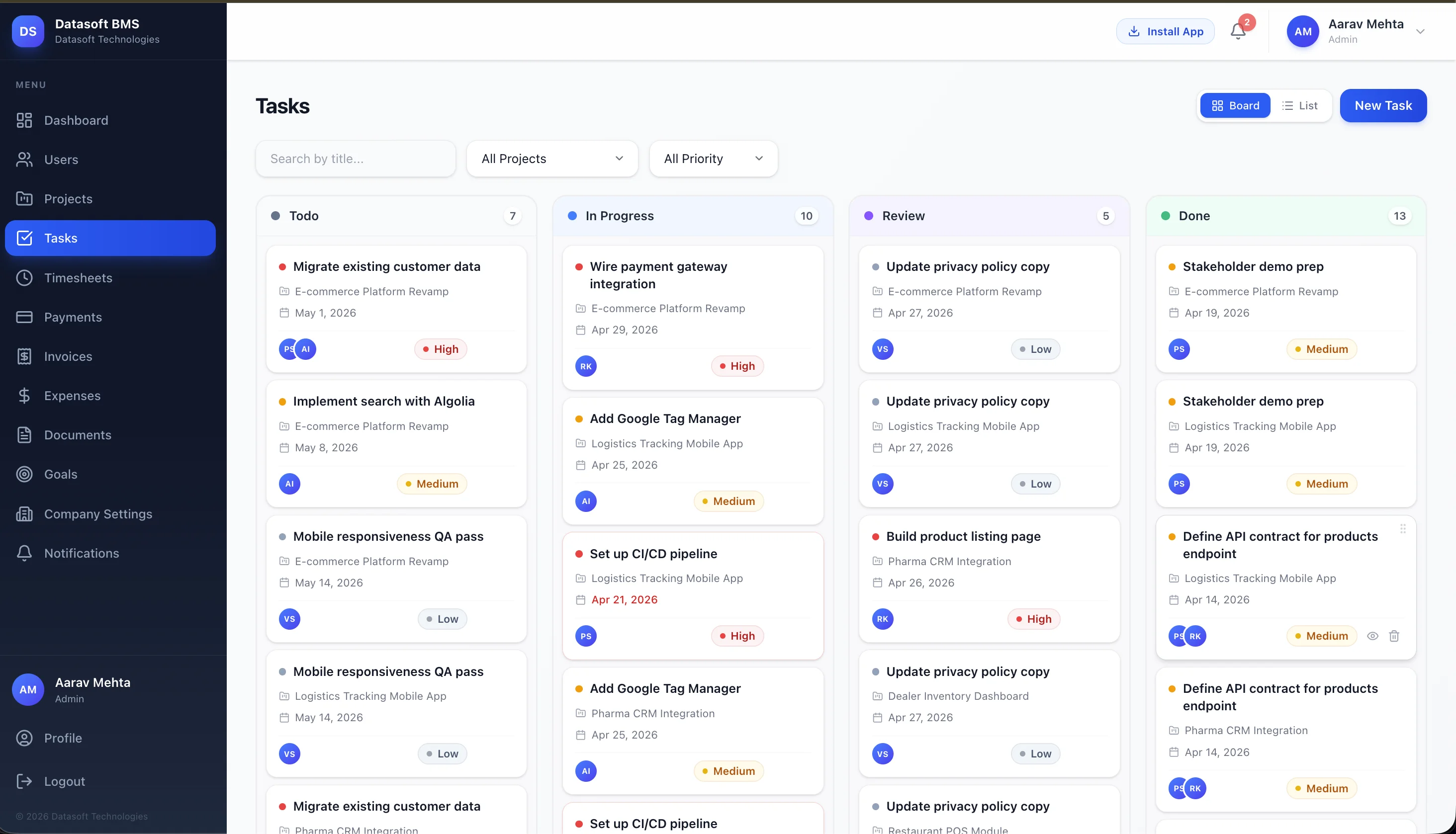
Task Kanban + List Views
Every task has an owner, a deadline and a status that flows from Todo to In Progress to Review to Done. Switch between Kanban and List on the same data, filter by project or priority, and keep tasks either project-bound or stand-alone.
Four-Column Kanban
Todo, In Progress, Review and Done: each card shows project, due date, priority and assignee avatars.
Multi-Assignee Tasks
task_user pivot allows assigning multiple employees to a single task with a clear audit trail.
Linked Expenses
Tasks can optionally link to an expense, which is handy for tying spend back to the work that incurred it.
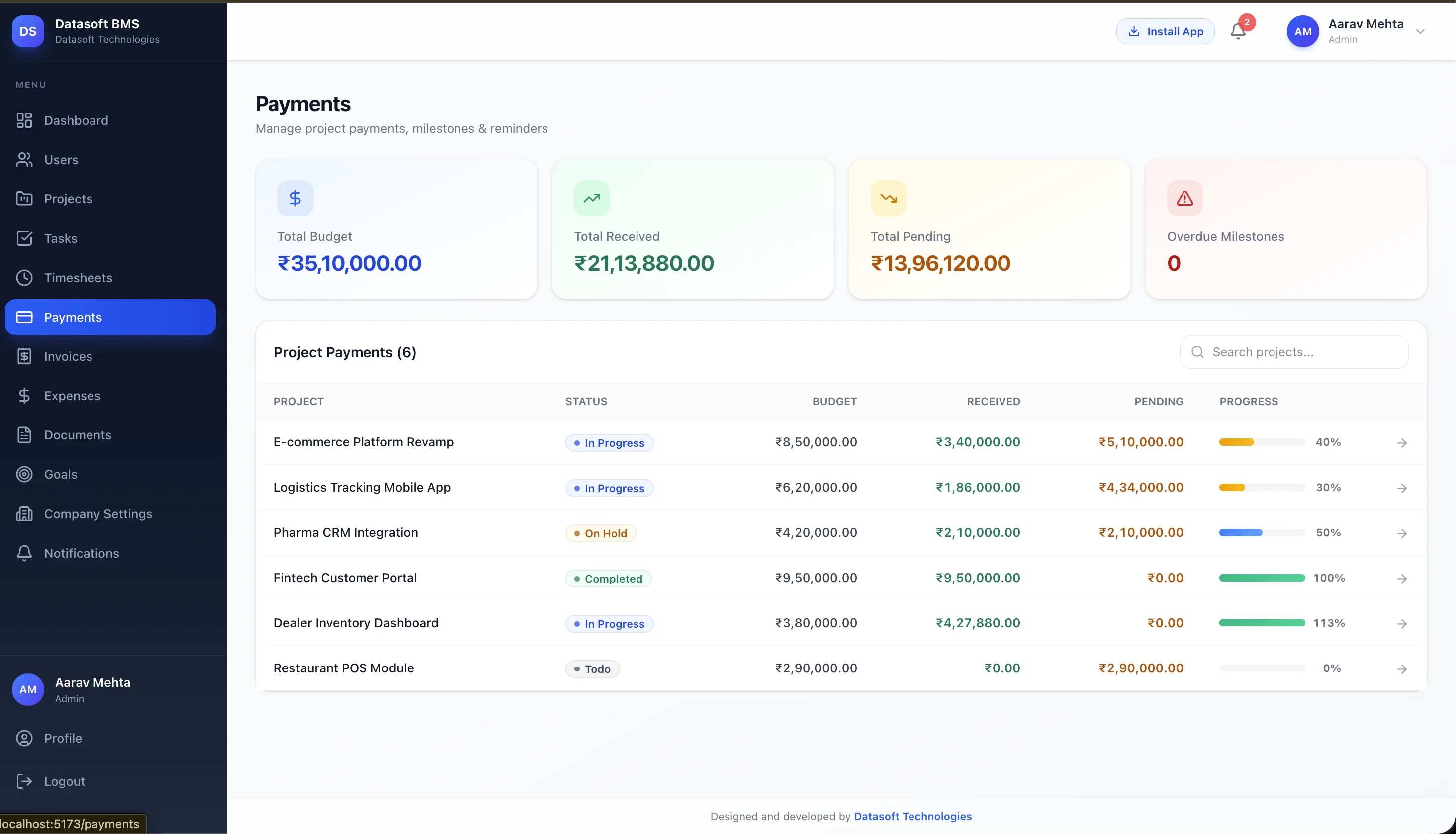
Milestone Payments & Reminders
Big projects rarely settle in one shot. The Payments hub rolls up Total Budget, Received, Pending and Overdue Milestones across every project, with a per-project breakdown showing exactly where money is and how each engagement is progressing.
Per-Project Milestones
Stage-gate payments tied to delivery milestones (30% kickoff, 40% mid, 30% final) fully configurable per project.
Automated Reminders
Reminder cadence is configurable per-project; clients are nudged before and after due dates without manual chasing.
Live Reconciliation
Mark payments received, attach receipts, and watch the project progress bar update across the whole platform.
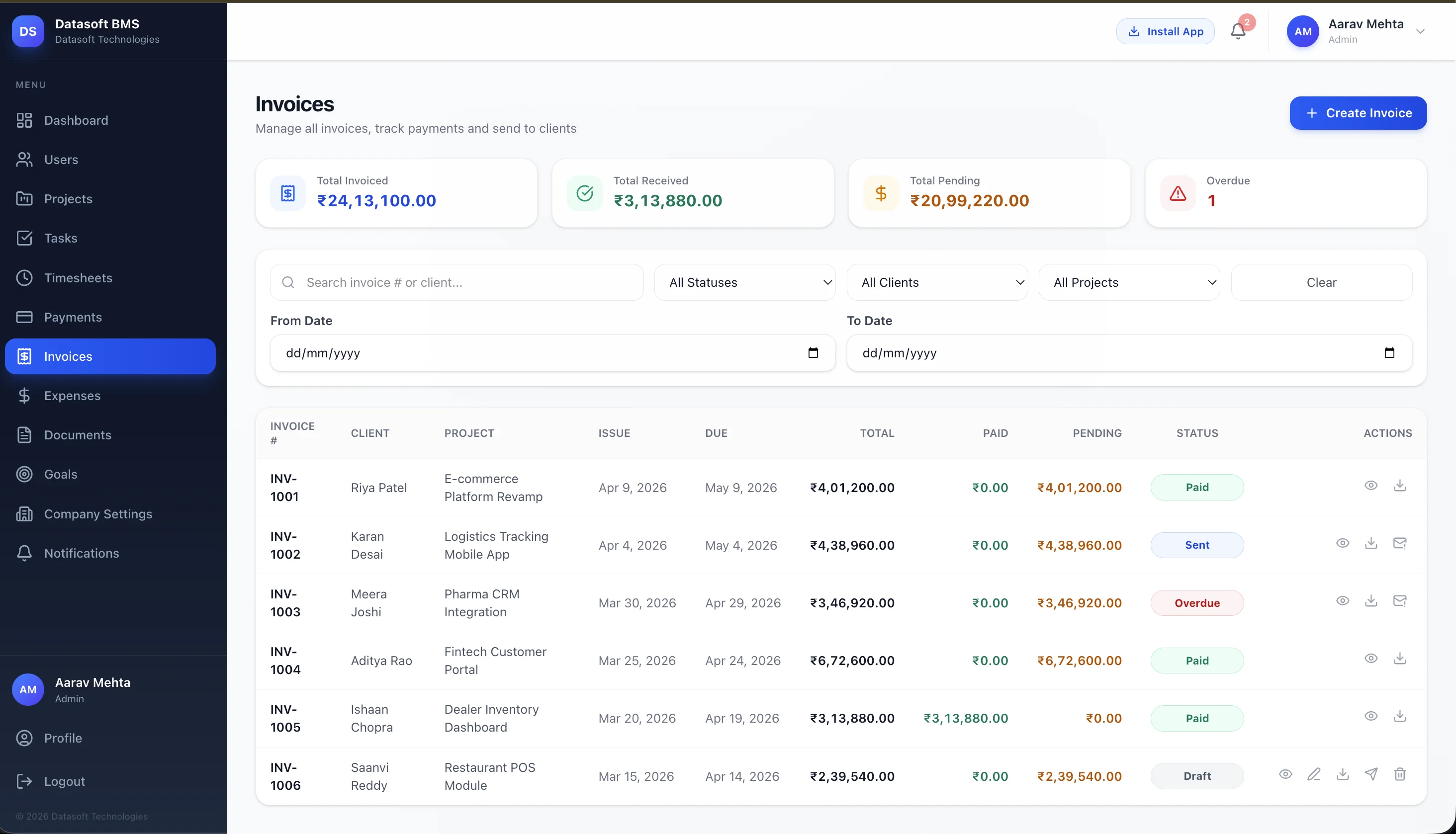
Invoices with PDF Export
A complete invoicing module. Track every invoice across the company with status badges (Paid, Sent, Overdue, Draft), client and project columns, and quick actions to view, download a brand-styled PDF, or send a reminder. Filter by status, client, project or date range.
Server-Rendered PDFs
Brand-styled invoices are generated server-side via barryvdh/laravel-dompdf, pulling company logo, GST and bank details from CompanySettings.
Detailed Line Items
Per-row description, quantity, rate and tax, with totals computed automatically and project linkage on every invoice.
Send & Remind
Issue invoices to clients with one click. They appear instantly in the client portal under ClientInvoices.
Expenses & Profit Analytics
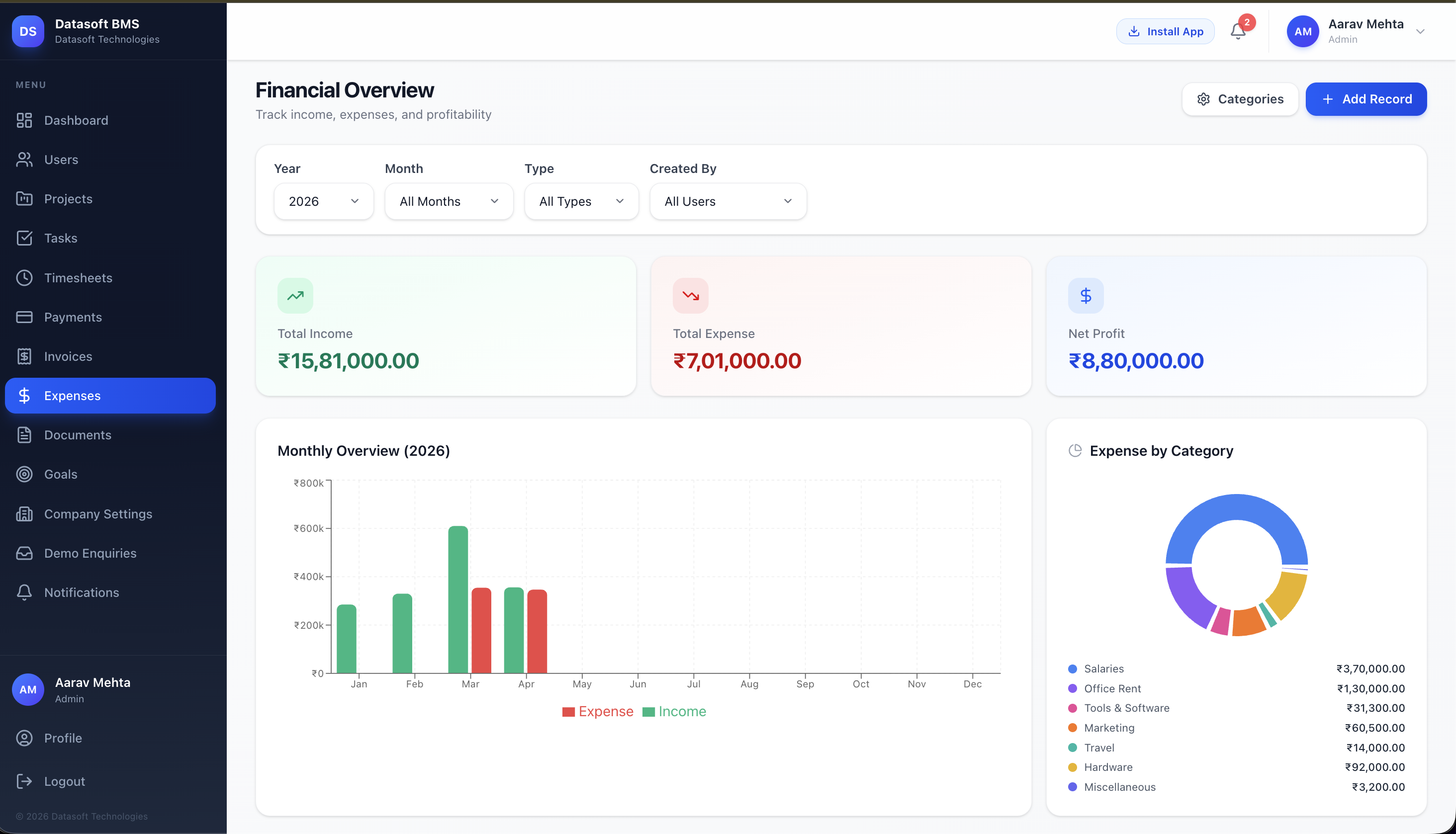
A full Financial Overview: Total Income, Total Expense and Net Profit at the top, a Monthly Overview bar chart of income vs. expense across the year, and an Expense by Category donut breaking spend into Salaries, Office Rent, Tools, Marketing, Travel and more.
Income vs. Expense Chart
Monthly bars across the calendar year let you instantly spot months in the red and trends across the business.
Category Breakdown
The Expense by Category donut shows where money goes: Salaries, Rent, Tools, Marketing, Travel, Hardware and more.
Task-Linked Expenses
Optional task linkage gives per-deliverable cost insight, and Net Profit recomputes itself as records change.
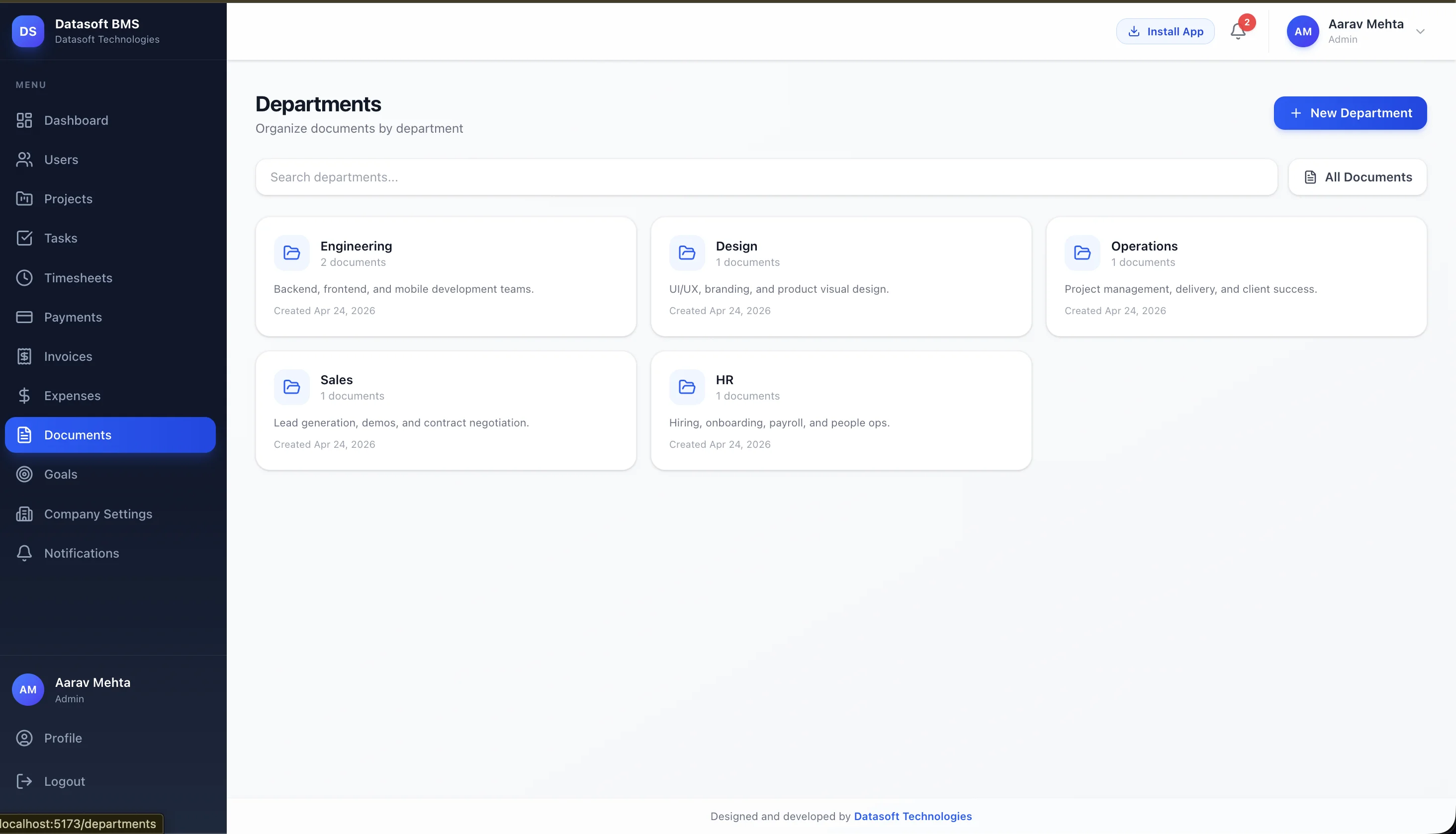
Documents by Department
Every team has its own knowledge base. Documents are grouped into Departments (Engineering, Design, Operations, Sales, HR), each with a description, document count and create date. Inline content editing means policies and SOPs live inside the platform, not on someone's laptop.
Department-Scoped Storage
Engineering, Design, Operations, Sales and HR each carry their own document set with clear ownership.
Search & All-Documents View
Filter departments by name, or jump to the full cross-department index with one click.
Inline Content Editing
Documents support rich-text body editing, well suited to SOPs, onboarding guides and policy text.
Goals, Plans & Notes
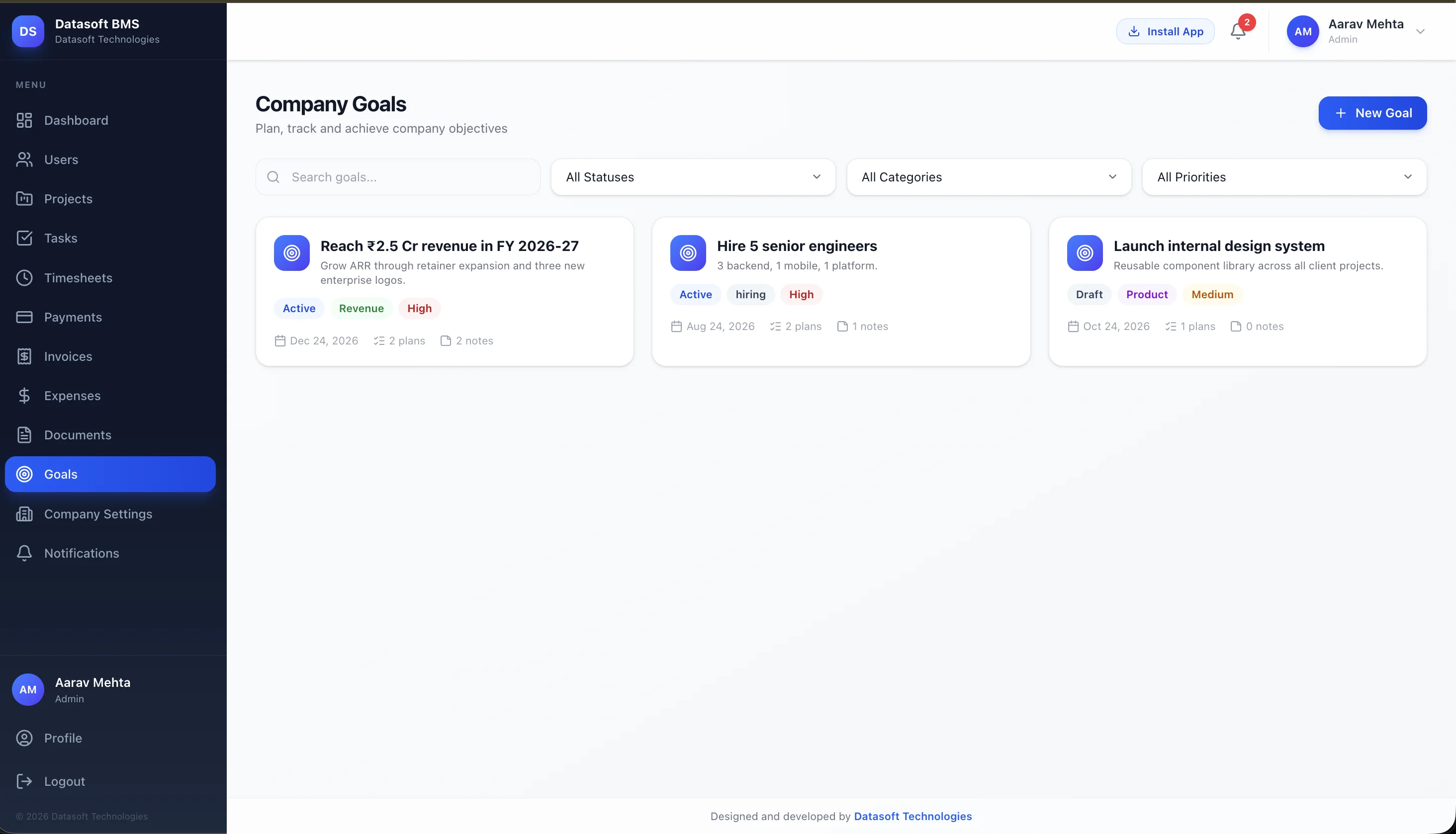
This is the layer beyond day-to-day work. Set quarterly goals (revenue targets, hiring plans, product launches), break each into plans, attach running notes as the strategy evolves, and tag with status, category and priority. It's the planning module that keeps the company pointed in one direction.
Goals + Tags
Each goal carries status (Active, Draft), category (Revenue, Hiring, Product) and priority, easy to scan.
Linked Plans
Goals roll down into plans with target dates, plan counts and progress visible on every card.
Goal Notes
Living context on what's working, what changed, and what's next: every goal keeps its own running note thread.
Company Settings & Branding
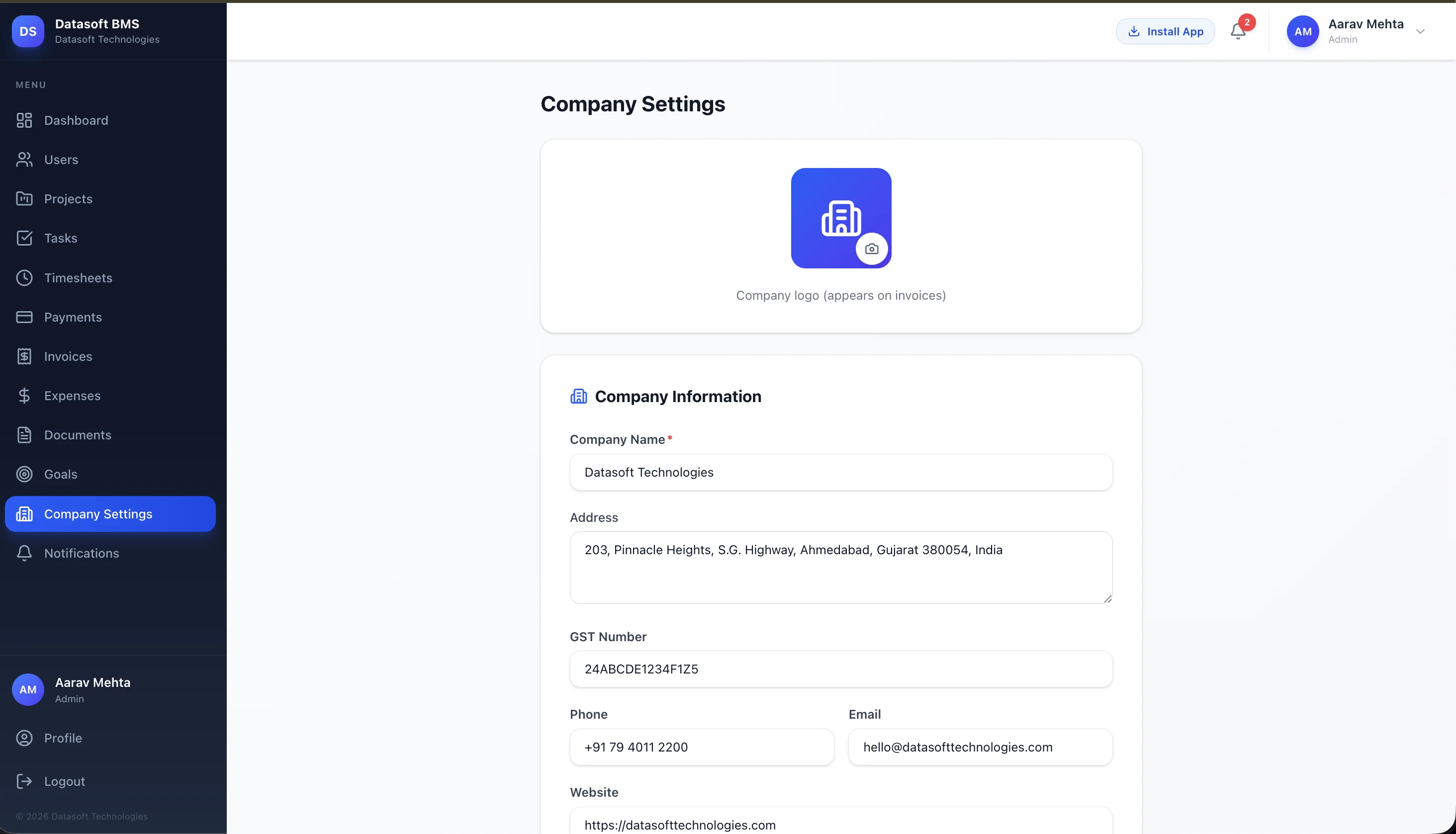
One place for the entire company identity: logo, name, registered address, GST, phone, email and website. Everything entered here flows automatically into invoice PDFs, the client portal header and outbound reminder emails.
Logo on Every Invoice
Upload once. The logo is embedded in dompdf-rendered invoice PDFs and shown in the client portal.
GST & Legal Details
Company name, address and GST number are required fields on Indian invoices, set once, applied everywhere.
Bank Details for Clients
Bank info entered here is what clients see on invoices and inside their portal, so there's no more pasting account numbers into emails.
Real-Time Notifications
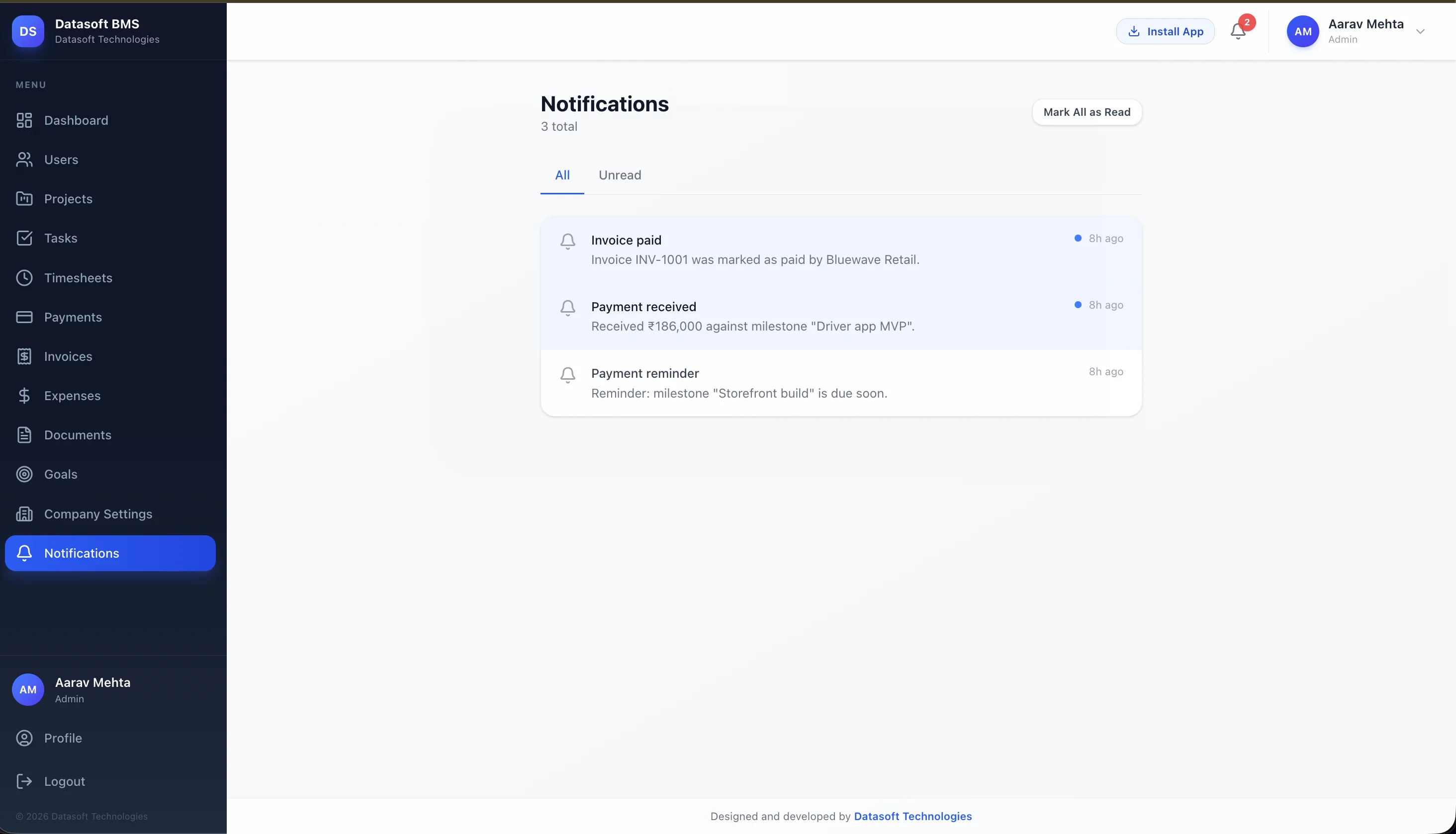
Nothing important slips through. Every key event (invoice paid, payment received against a milestone, upcoming due date) fires a notification stored per user, with All / Unread tabs and a one-click "Mark all as read". Email delivery is wired in and ready to switch on.
Invoice & Payment Events
Invoice paid, payment received against a milestone, payment reminder due, all surfaced in one inbox.
All / Unread Tabs
Switch between every notification and just the unread ones, header badge stays in sync across the app.
Email Delivery Ready
is_email_sent flag and per-user mail addresses are wired in, flip the SMTP switch to enable.
One Source of Truth for the Whole Company
No more juggling spreadsheets, email threads, and disconnected tools. Datasoft BMS unifies operations, finance, and client communication into a single, role-aware platform, built on a stack designed to scale.
Faster Onboarding
New team members and clients are productive in hours, not days.
Total Visibility
Owners see live progress, finances, and client activity at a glance.
Happier Clients
A dedicated portal means clients always know where their project stands.
Built to Scale
Decoupled API + SPA architecture ready for future mobile apps.
Services behind this build
Let's Build Your
Custom Business Platform
From operations dashboards to billing systems and client portals, we engineer secure, scalable, role-aware software tailored to your business.